Quick Answer: AppalNet is Appalachian State University’s online portal page where students, faculty and staff can access important App State services. It connects users to Self-Service, Gmail, DegreeWorks, AppCard Online, billing links, academic tools and other campus resources.
If you are new to Appalachian State University, you may hear people say, “Check AppalNet” or “Log in through AppalNet.” At first, it can feel like AppalNet is one big tool, but it is more like a starting page for many App State services.
Let me clear this up simply. AppalNet helps students get to the tools they need for classes, email, registration, payments, academic records and other university tasks. You may not use every link every day, but you will probably use some part of it during the semester.
What Is AppalNet?
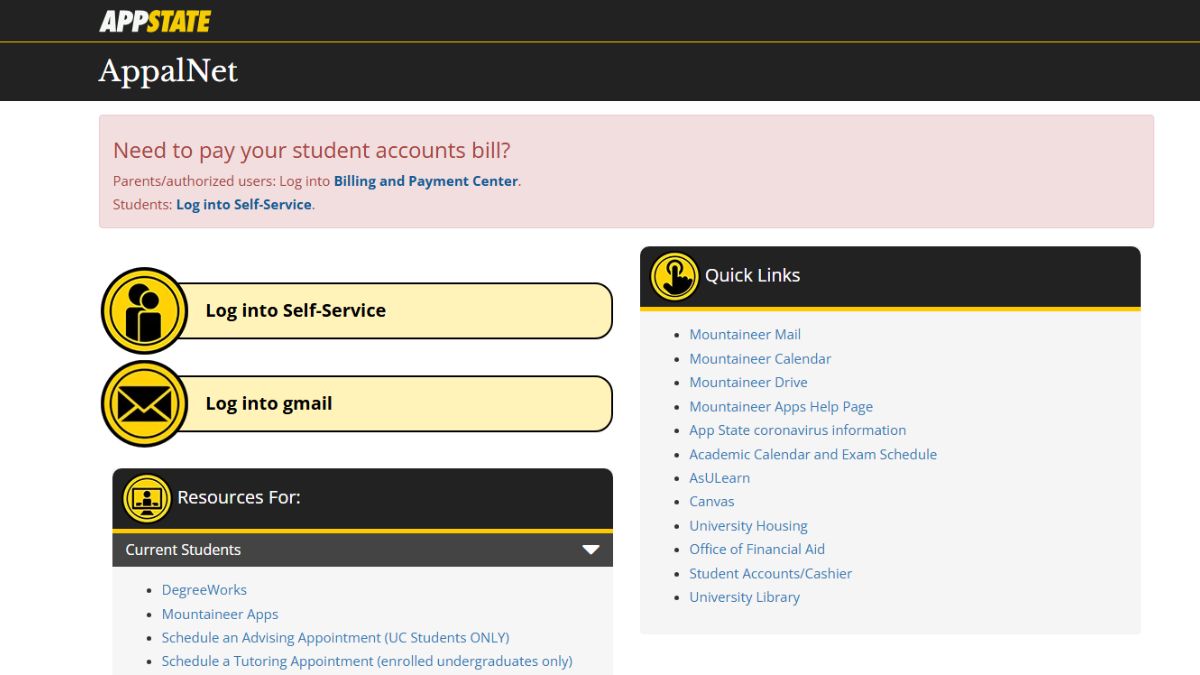
AppalNet is the main online access page for common App State tools. It is used by students, faculty and staff to reach services like Self-Service, Gmail and other university resources.
In simple words, AppalNet is not just one feature. It is more like a hub.
From AppalNet, students can go to Self-Service for academic and account tasks, open App State Gmail, check campus links, and find student resources. So when someone says “go to AppalNet,” they usually mean start there and choose the tool you need.
What Can You Access Through AppalNet?
AppalNet gives access to different App State tools and links. Some are for current students, some are for prospective students, and some are general campus resources.
Common things you may find through AppalNet include:
- Self-Service
- App State Gmail
- DegreeWorks
- AppCard Online
- Billing and Payment Center
- Academic Calendar
- Mountaineer Mail
- Mountaineer Drive
- AsULearn
- Canvas
- University Housing
- Parking Registration
Not every student will use all of these at the same time. A new student may mostly use email and Self-Service. A current student may use AppalNet for registration, class schedules, billing or DegreeWorks.
AppalNet vs Self-Service vs MyMountaineer
These names can get confusing, especially for new students. They are related, but they are not exactly the same thing.
| Tool | Simple meaning | Common use |
|---|---|---|
| AppalNet | Main portal page | Access App State tools |
| Self-Service | Student academic/account system | Registration, schedules, records, billing |
| MyMountaineer | Admissions focused portal | Applicant and admitted student steps |
| Gmail or Mountaineer Mail | App State email | University messages and communication |
So AppalNet is the starting point. Self-Service is one of the important tools you can reach from it. MyMountaineer is more connected to admissions and early student steps.
How to Use AppalNet as a Student
Using AppalNet is not too hard once you know what you are trying to open. The main thing is to choose the correct tool after reaching the portal page.
You can usually use it like this:
- Open the AppalNet page
Start from the AppalNet portal so you can see the main App State links in one place. - Choose the tool you need
If you need registration, records or billing, go to Self-Service. If you need email, open Gmail or Mountaineer Mail. - Sign in with your App State account
Use your App State username and password. If your account uses Duo, approve the login when asked. - Go to the right section
Inside Self-Service, students may need the Student tab for class registration, schedules, academic records or account options. - Complete your task
After you are in the right area, follow the page instructions for registration, payment, records or email.
Small thing, but useful. Do not open random login pages from search results if you are not sure. Start from the official App State portal or links your school gives you.
Common Things Students Do in AppalNet
Students use AppalNet for many normal college tasks. Some tasks happen directly from the AppalNet page, and some open inside Self-Service or another App State tool.
You may use it to check your class schedule, browse classes, register for classes, view registration time, check student records, apply for graduation, or view billing information.
You may also use AppalNet to open Gmail, check the academic calendar, access DegreeWorks, manage AppCard Online, or reach Canvas and AsULearn.
In short, AppalNet is one of those pages you may keep coming back to during the semester. Not because it does everything by itself, but because it points you to many things.
What If You Cannot Access AppalNet?
If you cannot access AppalNet, first check your username and password. If your App State account is new, make sure your account setup is complete, including password and Duo setup if required.
Try these simple checks:
- Make sure you are using your App State username
- Check your password
- Complete Duo approval if it appears
- Try another browser
- Clear browser cache if the page keeps failing
- Check if App State services are having an issue
- Contact App State technical support if it still does not work
If you can open AppalNet but not Self-Service, the issue may be with that tool only. If you cannot sign in anywhere with your App State account, then password or account setup is more likely the problem.
FAQs
What is AppalNet used for?
AppalNet is used to access important Appalachian State University tools, including Self-Service, Gmail, DegreeWorks, AppCard Online, billing links, academic calendars and other student resources.
Is AppalNet the same as Self-Service?
No, they are not exactly the same. AppalNet is the portal page. Self-Service is one of the main tools students can open through AppalNet for registration, records, schedules and billing.
Can new students use AppalNet?
Yes, new students may use AppalNet after their App State account is set up. Some early admissions steps may also use MyMountaineer, so it depends on where the student is in the process.
What can I do in AppalNet Self-Service?
Students can use Self-Service for things like registration, viewing class schedules, checking registration status, viewing records, and accessing student account or billing related options.
Who can use AppalNet?
AppalNet is mainly for Appalachian State University students, faculty and staff. Some linked services may also be useful for prospective students or authorized users, depending on the task.
Final Thoughts
AppalNet is mainly a starting point for important App State online services. If you need Self-Service, Gmail, DegreeWorks, AppCard, billing or student resources, AppalNet helps you get there from one place.
For new students, my honest advice is simple. Learn where AppalNet is early, because you will probably use it many times during your App State journe.

I’ve been into SEO and blogging for over 7 years. I help websites show up higher on search engines. I really enjoy writing helpful guides, especially about gaming and tech stuff.