
You open ARC Raiders, and suddenly ART00004 shows up. It blocks you from logging in or joining a match.
When this happens, the game can’t connect to Embark Studios servers, but sometimes your own network causes it too. This guide explains what the error means, why it happens, how to fix it step by step, and how to stop it from coming back.
What Is ARC Raiders Error ART00004?
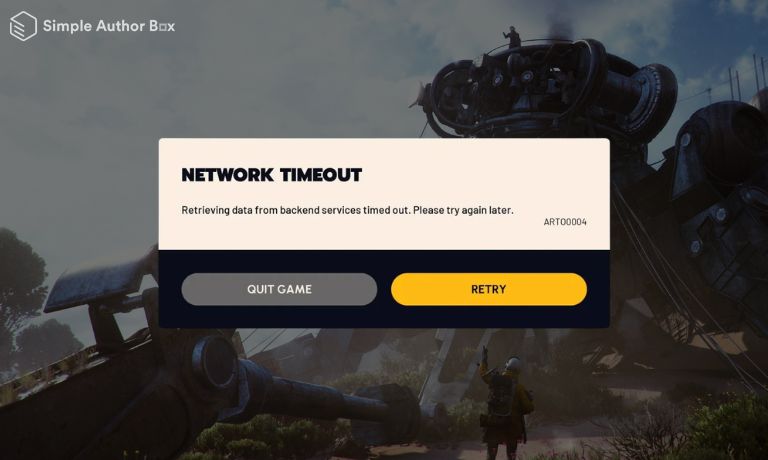
ART00004 is a connection and authentication error. It shows up when your game client cannot send or receive data from the servers managed by Embark Studios. When you launch the game, your system sends a request to log in, but if the server does not respond properly, the connection fails.
This can happen due to server downtime, network instability, or blocked requests from your device.
The game depends on stable communication between your device, your internet connection, and the server system, so even a small break in that chain can trigger this error.
You usually see this error on the login screen, loading screen, or during matchmaking. It can appear on platforms like Steam, Epic Games, PlayStation Network, or Xbox Live. The message looks simple, but it points to a deeper connection problem.
Common Causes of ARC Raiders Error ART00004
This error can happen for several reasons, depending on your system and network setup.
- Server downtime or maintenance from Embark Studios
- Platform service issues on Steam or Epic Games
- Weak or unstable internet connection causing packet loss
- Incorrect DNS settings that fail to reach game servers
- VPN or proxy interfering with authentication requests
- Corrupted game files or damaged cache data
- Firewall or antivirus blocking network traffic
How to Fix ARC Raiders Error ART00004?
To resolve this issue efficiently, you need to check both your network and system settings. However, most fixes are simple and only take a few minutes.
Fix #1: Restart the Game and Device
This error often appears due to temporary glitches. Restarting clears memory and refreshes your connection to the servers.
Try these simple steps to quickly restart your system and game.
- Close ARC Raiders completely
- Restart your PC or console
- Launch the game again
- Wait until it fully loads
- Try logging in again
Fix #2: Check Server Status
Sometimes the issue is not on your side. If Embark Studios servers are down, your game cannot connect no matter what you try. This can happen during updates, maintenance, or heavy player traffic. In such cases, waiting is the only option, and once servers recover, the error usually disappears without any changes on your system.
Fix #3: Verify Game Files
Corrupted game files can break communication between your system and the servers.
Follow the steps below to easily verify your game files.
- Open Steam or Epic Games
- Go to your game library
- Select ARC Raiders
- Open properties or settings
- Click verify or repair files
- Wait for the process to complete
Fix #4: Restart Your Internet Router
A weak connection can stop your system from reaching the game servers. Restarting your router refreshes your network, clears small connection issues, and improves stability. Even if your internet seems fine, hidden delays or packet loss can still cause problems, so this step often helps more than expected.
Fix #5: Flush DNS Cache
Incorrect DNS data can prevent your system from locating the correct server.
Here are the following steps which help you to flush DNS.
- Open Command Prompt
- Type ipconfig /flushdns
- Press Enter
- Wait for confirmation
- Restart your system
Fix #6: Disable VPN or Proxy
VPN services can redirect your connection through different regions, which may conflict with server authentication systems. When this happens, the server may reject your request. Turning off the VPN allows your system to connect directly, which often resolves the issue quickly.
Fix #7: Allow ARC Raiders Through Firewall
Firewall settings can block the game from accessing the internet.
Follow these easy instructions to allow the game through your firewall.
- Open Windows Security
- Go to Firewall settings
- Click Allow an app
- Find ARC Raiders
- Enable access on private and public networks
- Save changes
Fix #8: Reinstall ARC Raiders
If the problem continues, the installation may be corrupted. Reinstalling removes damaged files and installs a fresh version of the game. This helps fix deeper issues that simple repairs cannot solve, and it ensures your game client works properly with the servers.
Is ART00004 a Server Issue or Your Problem?
In most cases, this error is caused by server-side issues. When Embark Studios servers are overloaded or under maintenance, they cannot respond to every player request. This leads to connection failures, even if your system works perfectly. It is common during updates or when many players try to log in at the same time, so the issue is often temporary and resolves once server load decreases.
However, sometimes the issue can come from your side. Problems like unstable internet, blocked connections, or corrupted game files can also trigger the error. That’s why it is important to try basic fixes before assuming the servers are the only cause.
Prevention Tips to Avoid ART00004
Taking a few simple steps can help you avoid this error in the future.
- Keep ARC Raiders updated with the latest patches
- Use a stable internet connection
- Restart your router regularly
- Avoid using VPN while gaming
- Keep firewall settings properly configured
- Verify game files after updates
- Follow updates from Embark Studios
Conclusion
ART00004 is mainly a connection error that happens when your device cannot communicate with the game servers. It is often caused by server downtime, network issues, or corrupted files, and it can appear across platforms like Steam and Epic Games. The good thing is that most causes are simple and can be fixed with basic troubleshooting steps.
Try each fix step by step and see what works for you. If the issue still continues, you may need to contact Embark Studios support for further help. If this guide helped you, share it or leave a comment so others can fix the same issue faster.

I’ve been into SEO and blogging for over 7 years. I help websites show up higher on search engines. I really enjoy writing helpful guides, especially about gaming and tech stuff.
