
You open Roblox, enter your login details, and expect to get in like usual. Instead, a small message appears saying “An error was encountered during authentication” and sometimes shows error code 403. The login just stops there.
It feels confusing. You know your password is correct. Your account is fine. Still, the system refuses to let you in. That’s where most people start thinking something is wrong with their account.
But slow down a bit. This error is not always about your account. In many cases, it’s just a temporary block in how Roblox verifies your login request. The system is trying to protect your account, but sometimes it becomes too strict.
Let’s understand what this means first, then fix it step by step.
What Does “Authentication Error” Mean in Roblox
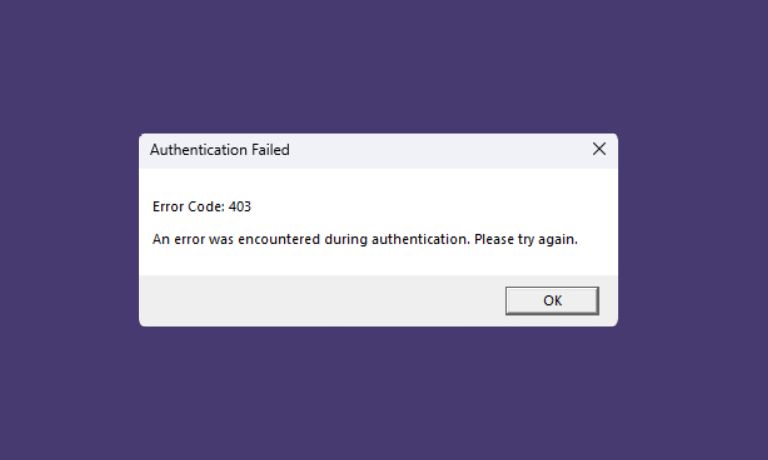
When you log into Roblox, the system does more than just check your username and password. It also verifies your device, your location, and how the login request is coming in.
This process is called authentication. It is a security step that confirms you are the real user.
When the message shows up, it means Roblox could not complete that verification. Error code 403 usually means access is blocked, not because your password is wrong, but because something about the request looks unusual or incomplete.
So the system stops the login to stay safe.
Why Roblox Shows Authentication Error
This error can happen for different reasons. Most of them are small issues, but they affect how the login request reaches Roblox servers.
Here are the common causes:
- Corrupted cookies or old session data
- Using a VPN or proxy that changes your location
- Roblox server issues or temporary downtime
- Incorrect system date and time
- Firewall or antivirus blocking connection
- Suspicious login attempt detected by Roblox
Sometimes it is just one issue. Sometimes it is a mix of two or three things at the same time.
How to Fix “An Error Was Encountered During Authentication” in Roblox
If you are experiencing this error in Roblox, try these fixes one by one. Take your time with each step, don’t rush, and check after every fix.
1. Refresh and Try Logging In Again
Start simple. Refresh the page or close and reopen the app.
Sometimes the login request just fails once due to a small delay or connection issue. A fresh attempt can fix it instantly. After refreshing, enter your details again and try logging in.
2. Check Your Internet Connection
Your connection plays a big role in authentication. If your internet is unstable, the login request may not reach Roblox properly.
Even small interruptions can break the process. Try switching networks, or restart your router. You can also test other websites to see if they load normally.
If your connection is weak, fix that first before trying again.
3. Clear Browser Cookies and Cache
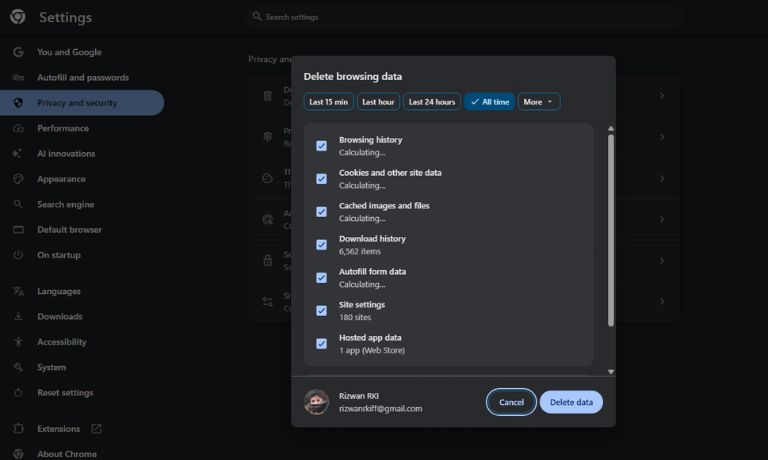
Browsers store login data to make things faster. But over time, this stored data can become outdated or corrupted.
When that happens, Roblox may receive incorrect session information, which leads to authentication failure.
Follow these steps:
- Open your browser settings
- Go to privacy or security
- Select Clear browsing data
- Choose cookies and cached files
- Clear the data and restart the browser
After that, reopen Roblox and try logging in again.
4. Disable VPN or Proxy
If you are using a VPN, it may change your IP address and location. Roblox sees this as unusual activity. As a result, the system may block the login request for safety reasons. Turn off your VPN or proxy and then try logging in again using your normal connection.
5. Try Another Browser or Roblox App
Sometimes the issue is limited to one platform. Your browser may have a conflict, or the app may have a bug.
Try logging in using another browser like Chrome or Edge. If you are using a browser, try the Roblox app instead.
This helps you quickly see if the problem is device or platform related.
6. Check System Date and Time
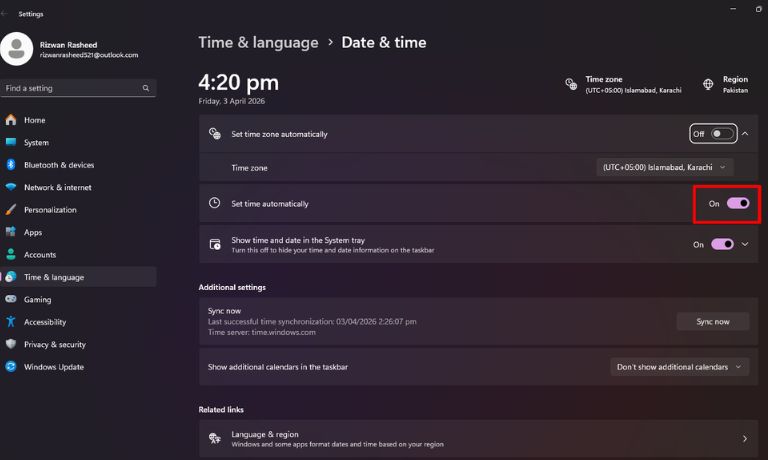
This may sound small, but it matters more than people think. If your system date or time is incorrect, it can affect how authentication works.
Roblox servers rely on accurate timing to verify requests. If your device time is off, the request may look invalid.
Make sure your system date and time are set correctly, preferably on automatic mode.
7. Disable Antivirus or Firewall Temporarily
Security software can sometimes block safe connections by mistake. Roblox login requests may get filtered or stopped without showing a clear warning.
Temporarily disable your antivirus or firewall and try logging in again.
If it works, then you may need to add Roblox as an exception so it does not get blocked again.
8. Log Out from All Devices
If your account is active on multiple devices, it can sometimes create session conflicts.
Logging out from all devices resets your login sessions and clears any hidden conflicts.
After that, try logging in again from one device only.
9. Wait and Check Roblox Server Status
Sometimes the issue is not from your side at all. Roblox servers may be under maintenance or facing temporary issues.
When that happens, authentication requests fail for many users at the same time.
You can check online if others are reporting the same problem. If servers are down, the only solution is to wait.
Why Roblox Blocks Authentication Requests
Roblox uses strong security checks to protect accounts. It looks at your login behavior, your location, and your device details.
If something does not match your usual pattern, the system becomes careful. For example, logging in from a new location or using a different IP address can trigger a block.
It does not mean your account is in danger. It just means the system wants to verify things more carefully before allowing access.
This is why the error appears even when your login details are correct.
Is This Error From Your Side or Roblox Servers
This error can come from both sides. In many cases, it is caused by local issues like cookies, VPN, or connection problems.
But sometimes, it comes from Roblox servers during maintenance or heavy traffic.
The best way to understand is to try a few fixes. If nothing works and others are facing the same issue, then it is likely a server problem.
How to Prevent Roblox Authentication Errors
You don’t need to do anything complex, just keep things stable and simple.
- Avoid using VPN while logging in
- Keep your browser clean and updated
- Use a stable internet connection
- Check your system time regularly
- Avoid switching devices too often during login
These small steps help keep your login smooth.
Final Thoughts
This authentication error may look confusing at first, but it is usually temporary and easy to fix. Most of the time it comes from small connection or security checks, not from your account itself.
Take it step by step, try each fix properly, and you will likely get back in without much trouble.
If this guide helped you, share it with others. And if you are still stuck, tell me what you are seeing, we can work through it together.

I’ve been into SEO and blogging for over 7 years. I help websites show up higher on search engines. I really enjoy writing helpful guides, especially about gaming and tech stuff.
