
If you want to cancel your Fabletics VIP membership, the process is usually simple, but you need to use the right path and confirm the cancellation is complete. Fabletics says US members can cancel anytime with no cancellation fee by phone, Chat Messenger, or from the My Account page.
What Does It Mean to Cancel a Fabletics Membership?
Canceling your Fabletics membership stops future VIP billing. It does not mean your basic account disappears. Fabletics says that after you cancel, you can still shop on the site at retail prices.
Fabletics also says unused VIP Credits can still be redeemed after cancellation. Its current US help page says those credits expire 12 months after purchase, so canceling does not automatically erase them right away.
Why Do People Get Confused When Canceling Fabletics?
A lot of users get confused because Fabletics has more than one membership action, and those actions are not the same.
Common reasons include:
- They confuse Skip the Month with full cancellation
- They cannot find the cancel option in My Account
- They are not sure whether to use phone, chat, or account settings
- They wait too close to the next billing date
- They do not save a cancellation confirmation
- They read help information for the wrong region instead of their own country page
How to Cancel Fabletics Membership
To stop future Fabletics VIP charges, use one of the methods below. After that, check your account status and save proof of cancellation.
1. Cancel Fabletics by phone

Fabletics says US members can cancel by calling customer service at 1-844-322-5384, and its help page lists that phone support as available 24 hours a day, 7 days a week.
Use these steps:
- Call 1-844-322-5384
- Ask the agent to cancel your VIP membership
- Ask when the cancellation takes effect
- Ask what happens to any unused VIP Credits
- Save any email or case confirmation you receive
This is a good option if you want direct confirmation from a real person.
2. Cancel Fabletics through live chat or Chat Messenger
Fabletics also says you can cancel your membership through Chat Messenger. Its support page lists live chat and web messaging as available 24 hours a day, 7 days a week, which makes this one of the easiest options for people who do not want to call customer service.
To use this method, go to the Help or Contact section on the Fabletics website and start a live chat or Chat Messenger session. Once the chat opens, tell the support agent that you want to cancel your VIP membership. Then wait until the agent confirms that the cancellation request has been completed.
After that, it is a good idea to save the chat transcript or take a screenshot of the final message. That gives you proof in case you need to check your membership status later or if another monthly charge appears by mistake.
This method works well for users who want a quick online cancellation without using the phone.
3. Cancel Fabletics from your account page
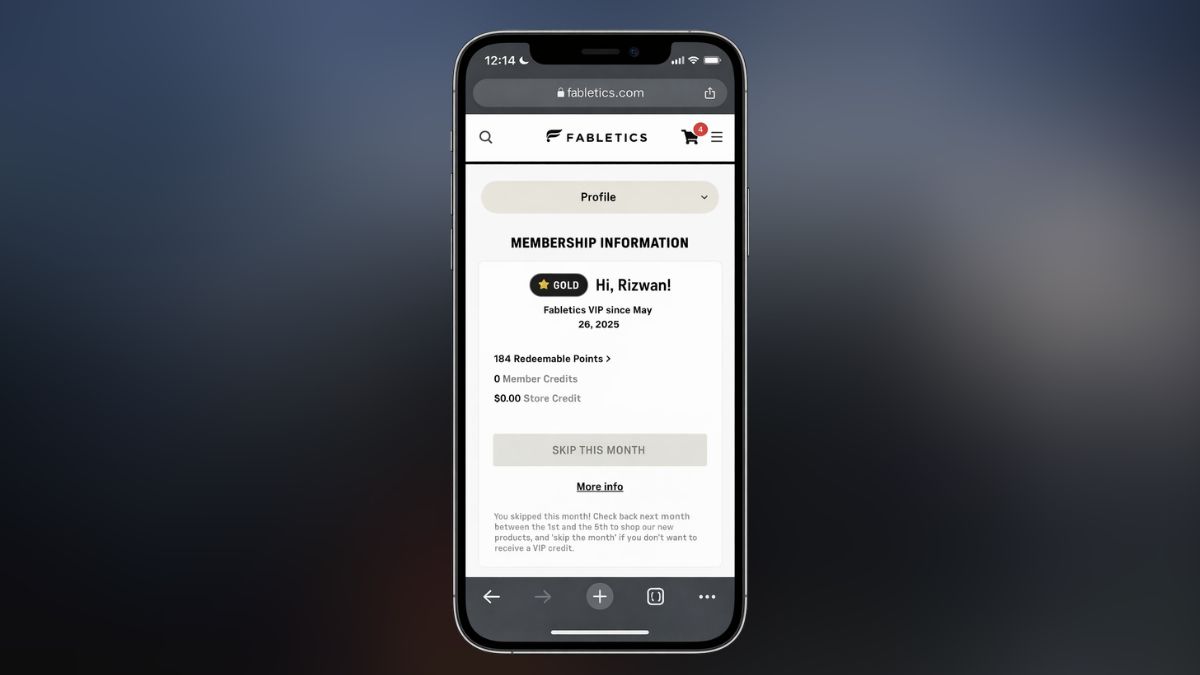
Fabletics’ current US help article also says members may cancel by visiting the My Account page.
Use these steps:
- Sign in to your Fabletics account
- Open the My Account section
- Look for membership or billing settings
- Select the cancellation option if it appears
- Follow the final prompts
- Recheck your membership status after finishing
This is the easiest option for people who want to handle the cancellation online without talking to support.
4. Make sure you are using the right region rules
This part matters more than people think. The help page I checked is for the United States. Fabletics shows multiple country regions in its support system, so cancellation paths can vary by location.
That means you should always check the help center for your own country before canceling. If the instructions look different from what you see in your account, follow the version tied to your own region.
5. Confirm the cancellation is complete
Do not stop at the request itself. Always check that your Fabletics account no longer shows an active renewal and keep some kind of proof.
That proof can be:
- a confirmation email
- a saved chat transcript
- a screenshot of the account status
- a support case number
This matters most if your next monthly charge is close.
What Happens to VIP Credits After You Cancel?
Fabletics says unused VIP Credits can still be redeemed after you cancel your VIP membership. That is important because many users worry they will lose those credits the moment they cancel. According to the current US help page, that is not how it works.
At the same time, Fabletics says those VIP Credits expire after 12 months from purchase. So if you plan to use them after canceling, do not leave them sitting too long.
How to Avoid Another Fabletics Charge
If your goal is to stop the next Fabletics monthly charge, timing matters.
Use these tips:
- Cancel before your next billing date
- Do not confuse Skip the Month with ending the membership
- Save your cancellation proof
- Recheck your account page after canceling
- Contact support again if the account still looks active
Fabletics’ current help page says cancellation is allowed anytime, but you still want to make sure the request is finished before the next charge cycle hits.
What to Do If You Cannot Cancel Fabletics Membership
If the online cancel option is missing, do not keep guessing.
First, check your My Account page again. Fabletics says that is one of the available US cancellation routes. If you still do not see the option, use Chat Messenger or call Member Services directly instead.
If support helps you cancel, save the proof right away. That gives you something to reference later if your billing status does not update the way it should.
Wrap-up
Canceling a Fabletics membership is usually simple once you use the right path. Phone, chat, and the My Account page are all listed by Fabletics as current US cancellation options, and the company says there is no cancellation fee. The key thing is to finish the process fully and keep your confirmation.
If this guide helped, share it with someone else trying to stop a Fabletics VIP charge. You can also leave a comment with the cancellation method that worked for you.

I’ve been into SEO and blogging for over 7 years. I help websites show up higher on search engines. I really enjoy writing helpful guides, especially about gaming and tech stuff.
